Get on your bike and get pedaling! Riding a bike is a piece of freedom and independence for children - and yet it harbors dangers that are almost impossible for the youngest road users to understand.
Primary school children learn how to ride their bikes safely as part of the road safety organization's cycling training. Together with Kreisverkehrswacht Stendal e.V., K&L Verlag also provides an interactive coloring and workbook that deepens this knowledge in a playful way and motivates children to work intensively on it.
We think: "This book increases the safety of our children in road traffic" - and we are happy to support them in this!
Our commitment to young cyclists
What do the road signs mean? When is my bike roadworthy? Why should I wear a helmet? And what else do I need to look out for in traffic?
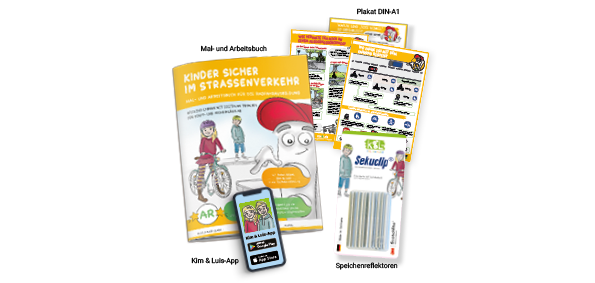
The coloring and workbook "Kinder sicher im Straßenverkehr" (Children safe on the road) combines child-friendly information, lovely coloring pictures and memorable learning tasks to prepare for the cycling test and improve safety on the bike. Girls and boys in third or fourth grade can deepen and expand their knowledge. Posters to hang up in the classroom ensure even greater learning success, as do additional videos and other digital content.
The integration of the latest digital augmented reality technology using the free Kim & Luis app is particularly exciting and illustrative. By correctly solving all the tasks, the children ultimately make a virtual bike roadworthy step by step - and are rewarded with a working bell, bright lights and much more for their participation.
The spoke reflectors increase the safety of children in road traffic. For this reason, the Stendal district road safety organization is also receiving reflectors for children to make them more visible.
It is only with the help of many local companies that the learning packages, consisting of workbooks, posters and an app, can be distributed free of charge to primary school children in the district of Stendal.
We are happy to be involved and support this important project with our sponsorship.
Would you like to learn more or get involved? For more information, visit www.kl-verlag.de.