This page has been automatically translated. There may therefore be discrepancies or inaccuracies in the text. Only the original version is binding. Legal claims arising from the content of the translated version are excluded.

Combating the Oak Processionary Moth (OPM)

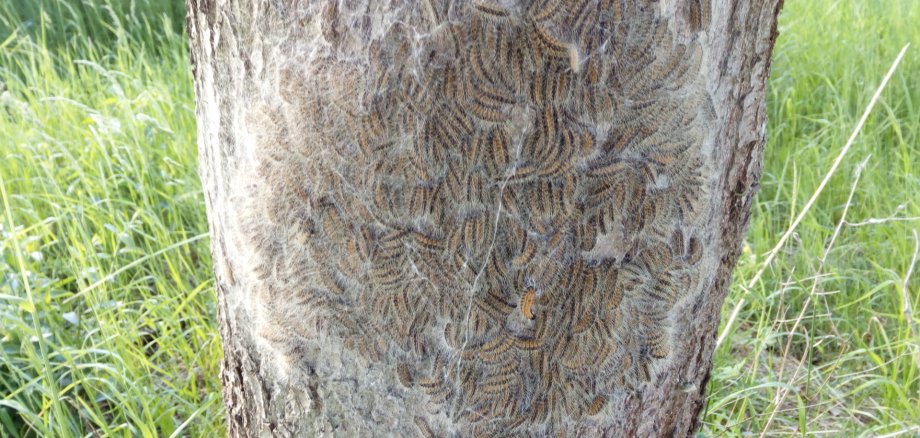
Unfortunately, the oak processionary moth (EPS) is more prevalent this year than it has been in nearly eight years. We have treated 14 hectares by helicopter and 2,000 trees from the ground. However, the results have been less than satisfactory in some regions of the municipality. At this point, the approved pesticides are unfortunately no longer effective. The only option now is to vacuum up the nests, and even that won’t be possible for a few weeks, until the caterpillars and nest formation have reached a certain stage.

We are now asking the public for their help. Please report any such nests (within or on the outskirts of towns) to us, providing as precise a location as possible. This applies to both municipal and privately owned oak trees. If private owners wish to participate in this effort, they should expect costs of approximately €60 per oak tree. The cost is lower for smaller trees. Please send the locations of such infested oak trees by email to ordnungsamt@vgem-seehausen.de or by phone at 039386-9820. You can also use the “Sag’s uns einfach” reporting portal on our website at https://www.seehausen-altmark.de/.../service/sagsunseinfach/.

We collect the reports and then schedule a vacuuming service based on urgency.


Help with accessibility

  • General

    We endeavor to make our websites accessible. You can find details on this in our accessibility statement. You can send us suggestions for improvement via our feedback form Report accessibility.

  • Font size

    To adjust the font size, please use the following key combinations:

    Larger

    command
    +

    Smaller

    command

    Larger

    Ctrl
    +

    Smaller

    Ctrl
  • Keyboard navigation

    Use TAB and SHIFT + TAB to navigate through next/previous links, form elements and buttons.

    Use ENTER to open links and interact with elements.

  • Contrast mode

    Press the following key combination to reduce or increase the contrast:

    Enlarge

    control
    option
    command
    .

    Decrease

    control
    option
    command
    ,
    Note: The shortcuts must be activated in the system settings of the operating system.

    Press the left ALT key + left SHIFT key + PRINT to quickly switch the high contrast mode on or off.

  • Invert colors

    Press the following key combination to switch color inversion on and off:

    control
    option
    command
    8
    Note: The shortcuts must be activated in the system settings of the operating system.

    First activate the screen magnifier and then switch the color inversion on and off with the following key combinations:

    1. screen magnifier

    +

    2. invert colors

    Ctrl
    Old
    I
  • Screen magnifier

    Press the following key combinations to use the screen magnifier:

    Switch on/off

    option
    command
    8

    Enlarge view

    option
    command
    =

    Reduce view

    option
    command
    Note: The shortcuts must be activated in the system settings of the operating system.

    Switch on / Enlarge view

    +

    Reduce view

Select language